
|
Can I just turn the photo over to deboss it ?: You can have an embossing die and turn the
photo over to embosse its back (debossing it’s front) but your art will appear as in a mirror (written backwards) when viewed from the photos front.
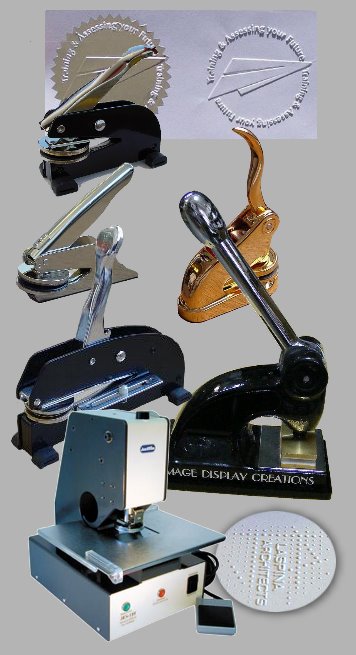
Can I easily change the die/art in the machine ?: You can easily and quickly change the embossing die by releasing a simple
spring clip. A die from the Small Hand Held can used on the Small Desk. However a die from the Small (Hand Held or Desk) can not be used on the Medium or Large. Also a die from a Medium can not be used on a Small
or a Large. A die from a Large can not be used on a Medium or Small.
How thick a paper can I embosse ?: We have given an indication above of the maximum thickness of paper you can embosse. See
the next two questions also.
Which machine should I choose for photographs ? For photographs we recommend the Small Hand Held, Small Desk or Medium Desk
depending on the detail and coverage of your artwork and how easy you want the physical process of applying pressure to be. If your artwork is very detailed with a lot of coverage over the area of the embossing/debossing
die you will need more pressure to embosse. Hence, if you will be doing a lot of work, to make it easier on yourself, we recommend either the Small Desk or Medium Desk.
Which machine should I choose for other media (paper/board) ?
For other medium (paper/board) you need to keep in mind that the embossing/debossing process is a combination of pressure, size of your artwork and thickness of the medium (paper/board) you are working with. Hence if your artwork is very detailed with a lot of coverage over the area of the embossing/debossing die you will need more pressure to embosse thicker medium. If you will also be doing a lot of embossing/debossing work you may want a medium or large machine (with more leverage) so that you don’t have to work so hard and so that you don’t strain the machine.
Of course if your art work is small and does not have as much coverage over the area of the die you will need less pressure.
Can I embosse canvas ?: You can, but canvas tends to have a “memory”, meaning that over time it tends to return to
it’s original shape.
What Now:
To order a machine you will need to provide us with/email your art, either:
- CorelDraw file (Versions 6 to 10) plus a low resolution JPEG file, or
- Adobe Illustrator file (Versions 6 to 8) plus a low resolution JPEG file, or
- MacroMedia Freehand file (Versions 7 to 10) plus a low resolution JPEG file, or
- PDF file saved with text converted to paths plus a low resolution JPEG file, or
- EPS file, real size, 600 dpi, no fill, outlines only, plus a low resolution JPEG file
You can also provide your art as follows but we will need to charge a preparation fee (we trace your artwork and convert it into a format we can
use):
- TIFF file real size, 600 dpi (PhotoShop and most other photo editing programs allow you to save your file in this format), or
- a good original mailed to us (eg, your signature in a very thick pen), or
- specifications/requirements from which we create your artwork for you.
You artwork’s size can not be over your machine’s maximum emboss area (stated above for each machine).
You will also need to tell us from which edge of the paper you are going to emboss (see Can I change the orientation of my art I am embossing
?) in the questions above.
Please telephone us to discuss your options and you can place your order (+61 2 9948 8883). Allow about 2 weeks from placement of your order
with artwork to our dispatching a machine. This time can however be shortened if necessary.
|